Once Sport Update: Smarter Project Organisation, NFL Auto-Mapping and Workflow Improvements
June 10, 2026
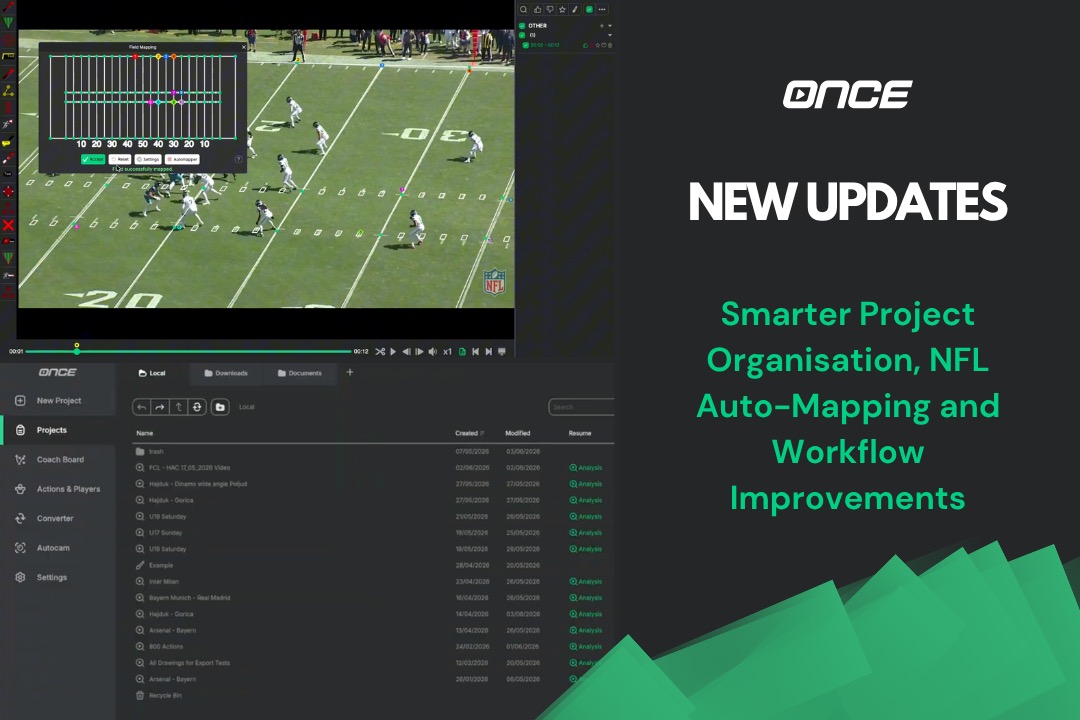
This latest Once Sport update brings a combination of major workflow improvements, interface redesigns, and powerful new features designed to make analysis faster, cleaner, and easier to manage.
From a completely redesigned Projects List to new media importing options and NFL American football auto-mapping, this release focuses heavily on improving the everyday coaching and analysis experience.
Let's dive in.
A Completely Redesigned Projects List
The biggest change in this version is the brand-new Projects List inside the main menu.
Managing projects inside Once Sport is now far more flexible and organised. Instead of scrolling through one long list, you can now create folders and structure your workspace exactly the way you want.
For example:
- keep all training sessions in one folder
- organise match analysis separately
- create dedicated scouting or opponent-analysis folders
As your project library grows, this becomes a huge improvement for daily workflows.
The new Projects List feels much more like a professional file explorer, but fully integrated into the Once Sport analysis workflow. Coaches and analysts can now navigate large amounts of content much faster, making project management significantly easier and cleaner.
Add Videos and Pictures Anywhere in Your Workflow
We've also introduced a powerful new way to build your analysis presentations.
Need to quickly add an extra clip before a meeting? Did another coach send you an analysis moments before training?
You can now add videos and pictures directly into the drawing screen through the Actions and Playlist tabs.
Simply right-click on a playlist, category, or action name, and insert your visual content instantly.
You can also drag and drop files directly into the app, including adding multiple files at the same time.
This gives coaches and analysts much more flexibility when preparing presentations. You are no longer limited to media already inside your current project. Instead, you can quickly bring in any supporting visual material exactly when you need it.
Major Improvements to Tagging and Recording windows
Another important part of this update is the redesign of the recording and tagging window.
The columns and Search bar inside the recording workflow have been completely rebuilt and modernised. The result is a more stable, reliable, and scalable system that also prepares the foundation for future features and improvements.
We've also added support for moving the recording window onto another monitor.
For analysts working with multiple screens during live tagging or match analysis, this creates a much smoother setup and allows for more efficient workflows during games and live events.
NFL American Football Auto-Mapping
Once Sport continues expanding its support across multiple sports.
This update introduces automatic field mapping for NFL American football, allowing analysts and coaches to map the field automatically with far less manual setup.
The new NFL auto-mapper helps speed up preparation workflows and makes creating tactical presentations and analysis sequences much easier for our American football users.
Faster, Smoother and Built for Simplicity
As always, a large part of this release focused on improvements behind the scenes.
We've continued optimising performance, responsiveness, stability, and the overall user experience, making Once Sport feel faster, smoother, and more reliable throughout the entire workflow.
From improved project organisation and flexible media workflows to better live analysis setups and new NFL American football support, every change is designed to help coaches and analysts work more efficiently without unnecessary complexity.
We're constantly working to make your analysis smoother, quicker, and easier-to-use.
Get the Latest Update
Thank you for being part of the Once Sport community and for continuing to share your feedback with us. We're already working on the next round of improvements. See you in the next update!
- Existing users – Open Once Sport Analyser and follow the on‑screen message to download and install the new version (4.7.5). You can also grab the newest installer from your Dashboard.
- New users – Register for a 14‑day free trial – no credit card required. Use the button below to get started.
That's it for this release, another step toward making Once Sport the most intuitive and powerful analysis tool in the world of sports.
Thanks for being part of the journey. Your feedback drives these updates, and we can't wait to show you what's coming next.
See you for the next update!
