Once Sport Update Animated Drawings and More Control in Draw Mode
November 19, 2026
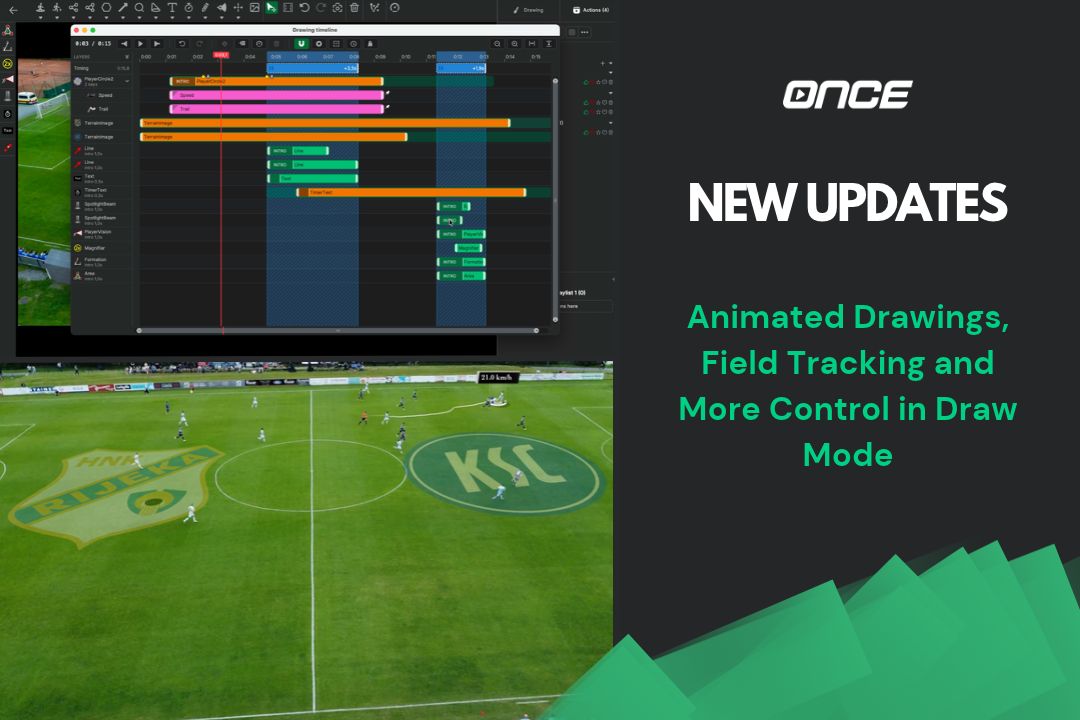
In our last release, we mentioned that a major upgrade to Draw mode was coming. This Once Sport update brings that upgrade to your analysis.
We’ve rebuilt the Draw screen with animated drawings, the ability to introduce drawings one after another during a pause, and more control over the pace and appearance of your clips. Whether you’re explaining a passing option or showing the space to attack, you can build the explanation around what your players need to see.
Introduce drawings one after another during a pause
A single moment can contain several details worth explaining. You can now introduce drawings one after another while the video is paused, giving each part of the explanation its own time on screen.
Start by highlighting the player on the ball, then show the passing option, add a short note, and finally mark the space to attack. Your players can follow one idea at a time. Each drawing can also appear and disappear with its own animation, so you control how the explanation unfolds.
Animate drawings with keyframes
Drawings can now change as the clip plays. Use keyframes to adjust a drawing’s position, size, shape or colour at different moments. An arrow can follow a passing option as it develops, then change colour when that option closes.
Add keyframes yourself, or turn on Auto keyframe while you work. All your drawing settings are now together in one sidebar, making it easier to find and adjust what you need.
Control the pace of your clip
The new Time segment tool lets you add pauses, slow motion and fast forward directly into a clip. Stop to explain a decision, slow down a key movement, and move quickly through the parts that need less attention.
This gives you more control over how long players spend on each part of the analysis. You can hold the moment that needs discussion, then continue the play at the pace that best shows what happens next.
Make graphics fit the pitch
You can now lay an image flat on the pitch so it looks painted on the grass. With Field tracking, drawings stay attached to the pitch even when the camera moves. This includes images and text, so your explanation stays connected to the area you’re discussing.
For more depth, use 3D lines and 3D edges to help your graphics fit the scene.
Refine the timing in the Drawing timeline
Open the Drawing timeline when you want more control over when each drawing appears and how it changes. Each drawing has its own row, showing its keyframes and animations, so you can refine the sequence.
Keep the timeline docked or open it in a separate window, particularly useful when working with two screens. The time shown under the video now includes your pauses, slow motion and fast forward, so you know how long the finished clip will be.
Edit several drawings together
Select several drawings to move them together and change their settings in one go. Copy and paste lets you reuse drawings, while snapping helps you line everything up neatly.
These changes reduce the need to repeat the same edits when your explanation includes several elements.
Useful changes to your everyday workflow
Playlists are now available directly in the Draw screen, where you can reorder clips with drag and drop.
Tracking several drawings is quicker too. Select the drawings you want to track and start tracking them all at once, instead of repeating the process for each one.
When previewing or exporting, you can choose between Actions and Playlists. You can also show action numbers in your notes and exported videos, adjust the size of your notes, and change the pause duration for a whole action or project in one go.
Get the Latest Update
This update brings new features and improvements to help you animate drawings, explain moments more clearly and streamline your analysis workflow.
Update today to explore the rebuilt Draw screen, drawings that appear one after another during a pause, keyframe animation, Field tracking, and more control over the timing of your clips.
- Existing users – Open Once Sport Analyser and follow the on-screen message to download and install the new version (4.11.5). You can also download the latest installer from your Dashboard.
- New users – Register for a 14-day free trial, with no credit card required. Use the button below to get started.
As always, thank you for being part of the Once Sport community. Your feedback helps shape every release, and we look forward to bringing you more improvements in the future.
See you in the next update!